CSS Basic Animations
分享者:@曹俊超
主要内容
- CSS 过渡(Transitions)
- CSS 动画(Animations)
- 应用示例
CSS Transitions
- Transition-* 属性
- transition-property
- transition-duration
- transition-timing-function
- transition-delay
- transition
- Transition 事件
- transitionstart
- transitionrun
- transitionend
- transitioncancel
transition-property
- 默认值:
all - 多个值:逗号分隔
- 重置:
none
transition-duration
时间单位:s、ms
transition-timing-function
和 animation-timing-function 可取值一样,由 CSS Timing 规范规定
transition-delay
负值也是合法的。Demo
Transition 事件
- transitionrun
- transitionstart
- transitionend
- transitioncancel
事件兼容性检测
const vendors = ['webkit', 'ms', 'moz', 'o'];
let isSupport = false;

[...vendors, ''].forEach(prefix => {
  if (`on${prefix}transitionend` in window) {
    isSupport = true;
  }
});

console.log(isSupport);
List with transtion demo
CSS Timing Functions
- Linear timing function: 'linear'
- Cubic Bézier timing functions
- Step timing functions
- Frames timing functions
Linear timing function
图像,与cubic-bezier(0,0,1,1)效果一样,但并非 cubic-bezier() 的特殊值
Cubic Bézier timing functions
- ease
cubic-bezier(0.25, 0.1, 0.25, 1)- ease-in
cubic-bezier(0.42, 0, 1, 1)- ease-out
cubic-bezier(0, 0, 0.58, 1)- ease-in-out
cubic-bezier(0.42, 0, 0.58, 1)- cubic-bezier(<number>, <number>, <number>, <number>)
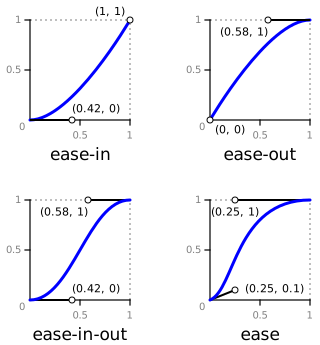
.box {
  width: 100px;
  height: 100px;
  background: #fa0;
}

.box.active {
  transform: translateX(300px);
  transition: transform 3s;
}

.demo-item.linear .box.active {
  transition-timing-function: linear;
}

.demo-item.ease .box.active {
  transition-timing-function: ease;
}

.demo-item.ease-in .box.active {
  transition-timing-function: ease-in;
}

.demo-item.ease-out .box.active {
  transition-timing-function: ease-out;
}

.demo-item.ease-in-out .box.active {
  transition-timing-function: ease-in-out;
}
Step timing functions
- step-start
steps(1, start)- step-end
steps(1, end)- steps(<integer>[, [start |end ]]?)
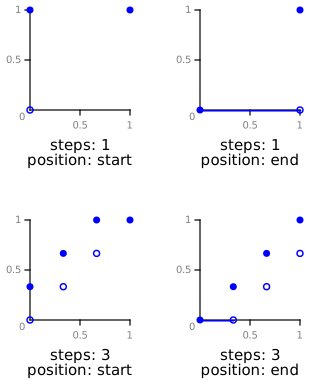
.box {
  width: 100px;
  height: 100px;
  background: #fa0;
}

.box.active {
  transform: translateX(300px);
  transition: transform 3s;
}

.demo-item.step-start .box.active {
  transition-timing-function: step-start;
}

.demo-item.step-end .box.active {
  transition-timing-function: step-end;
}

.demo-item.steps-start .box.active {
  transition-timing-function: steps(3, start);
}

.demo-item.steps-end .box.active {
  transition-timing-function: steps(3, end);
}
CSS Animations
- Keyframes
- animation-* properties
- Animation Events
Keyframes
  @keyframes move {
    from {
      transform: translate(0, 0);
    }

    to {
      transfrom: translate(100px, 100px);
    }
  }
  @keyframes move {
    0% {
      transform: translate(0, 0);
    }

    70%, 90% {
      transform: translate(120px, 0);
      animation-timing-function: ease-in;
    }

    80% {
      transfrom: translate(90px, 0);
      animation-timing-function: ease-out;
    }

    100% {
      transfrom: translate(100px, 0);
    }
  }
animation-* properties
- animation-name
- animation-duration
- animation-timing-function
- animation-iteration-count
- animation-direction
- animation-play-state
- animation-delay
- animation-fill-mode
- animation
animation-name
animation-iteration-count
/* Keyword value */
animation-iteration-count: infinite;

/*  values */
animation-iteration-count: 3;
animation-iteration-count: 2.4;

/* Multiple values */
animation-iteration-count: 2, 0, infinite;
animation-direction
animation-play-state
animation-fill-mode
animation
.box {
  animation: spin 50s linear infinite,
      bg 100s step-end infinite;
}
Animation events
- animationstart
- animationiteration
- animationend
- animationcancel